How to Recognize and Avoid Phishing Attacks
Quick summary: Phishing attacks try to create urgency, fear, or curiosity so people act before checking the details. They may arrive by email, text message, social media, or phone.
Phishing attacks try to create urgency, fear, or curiosity so people act before checking the details. They may arrive by email, text message, social media, or phone.
This guide explains the most important actions in a practical order. Focus on measures that reduce real risk, are easy to maintain, and fit the way your household uses technology.
Check the Sender Carefully
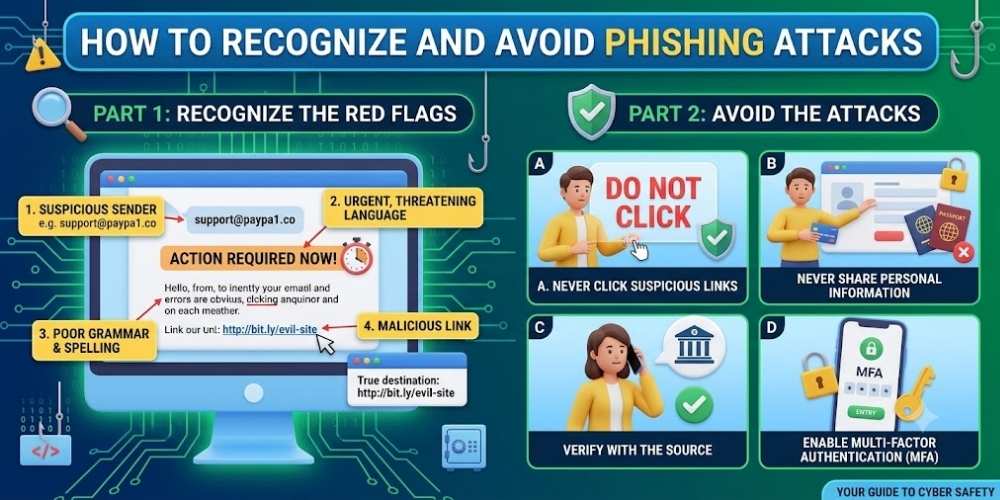
Display names can be faked. Examine the full email address and watch for misspellings, extra characters, or unrelated domains.
A familiar logo does not prove that a message is legitimate.
Treat Urgent Requests With Caution
Messages that threaten account closure, claim an unexpected payment, or demand immediate verification are common phishing tactics.
Pause and open the official website or app directly instead of clicking the message link.
Inspect Links Before Opening
Hover over links on a computer to preview the destination. On mobile, long-press carefully when supported.
Do not trust shortened links or domains designed to look similar to a real brand.
Never Share Verification Codes
Legitimate support teams should not ask for one-time passwords, recovery codes, or multi-factor authentication codes.
A caller requesting these codes may already have your password and be trying to complete the login.
Report and Delete Suspicious Messages
Use the service’s phishing-report option when available. Reporting helps providers block similar attacks.
After reporting, delete the message and warn family members if the scam targets a shared service.
Key Takeaway
Security improves when simple protections are applied consistently. Keep systems updated, limit unnecessary access, use strong account protection, and review settings whenever devices or household needs change.
Frequently Asked Questions
What should I do after clicking a phishing link?
Close the page, change the affected password from a trusted device, enable multi-factor authentication, and scan the device for malware.
Can phishing messages look professional?
Yes. Modern phishing messages can copy logos, formatting, and writing style, so always verify the sender and destination.
Are text-message scams also phishing?
Yes. Phishing by SMS is often called smishing and uses the same urgency and impersonation tactics.

Vital Morgan is a cybersecurity researcher and technology writer with a passion for digital privacy, smart home security, and online safety. He specializes in creating practical guides on VPNs, password protection, cybersecurity best practices, smart home devices, and emerging security technologies. His mission is to help readers protect their homes, devices, and personal information in an increasingly connected world.