Essential Cybersecurity Tips for Home Users
Quick summary: Home users face many of the same digital risks as businesses, but often without dedicated security support. A few practical habits can dramatically reduce exposure to account theft, malware, unsafe Wi-Fi, and privacy leaks.
Home users face many of the same digital risks as businesses, but often without dedicated security support. A few practical habits can dramatically reduce exposure to account theft, malware, unsafe Wi-Fi, and privacy leaks.
This guide explains the most important actions in a practical order. Focus on measures that reduce real risk, are easy to maintain, and fit the way your household uses technology.
Update Devices and Software Promptly
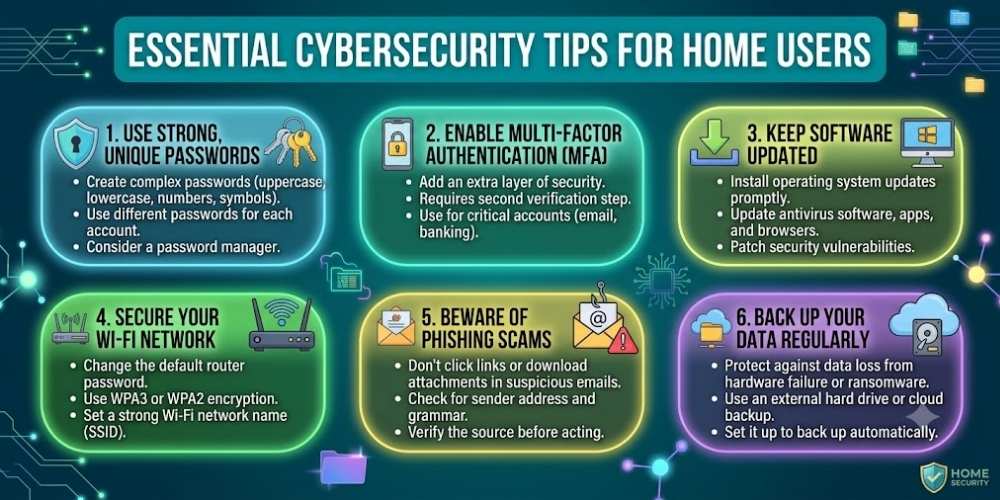
Install operating system, browser, router, and app updates as soon as they are available. Updates often fix security weaknesses that attackers already know how to exploit.
Enable automatic updates where possible, and replace devices that no longer receive security patches.
Use Strong, Unique Passwords
Create a different password for every important account. Reusing one password means a single breach can expose multiple services.
A reputable password manager can generate and store long, unique credentials without requiring you to memorize them.
Enable Multi-Factor Authentication
Multi-factor authentication adds a second verification step beyond the password. Prefer authenticator apps or security keys when available.
Turn it on first for email, banking, cloud storage, social media, and password manager accounts.
Secure Your Home Wi-Fi
Change the router administrator password, use WPA2 or WPA3 encryption, and disable outdated features such as WPS when they are not needed.
Create a guest network for visitors and smart devices so they do not share the same network as your main computers.
Back Up Important Data
Follow the 3-2-1 approach: keep three copies of important data, on two types of storage, with one copy stored off-site or in a secure cloud service.
Test backups occasionally to make sure files can actually be restored.
Key Takeaway
Security improves when simple protections are applied consistently. Keep systems updated, limit unnecessary access, use strong account protection, and review settings whenever devices or household needs change.
Frequently Asked Questions
What is the most important cybersecurity step for home users?
Using unique passwords and enabling multi-factor authentication on important accounts provides one of the strongest improvements for most home users.
How often should I update my router?
Install firmware updates whenever the manufacturer releases them and replace the router when it no longer receives security support.
Do home users really need antivirus software?
Modern operating systems include useful protections, but antivirus is only one layer. Safe browsing, updates, backups, and strong account security are equally important.

Vital Morgan is a cybersecurity researcher and technology writer with a passion for digital privacy, smart home security, and online safety. He specializes in creating practical guides on VPNs, password protection, cybersecurity best practices, smart home devices, and emerging security technologies. His mission is to help readers protect their homes, devices, and personal information in an increasingly connected world.