How to Create Strong Passwords You Can Manage
Quick summary: The strongest password strategy is not about memorizing dozens of complicated strings. It is about using unique credentials and a secure system for managing them.
The strongest password strategy is not about memorizing dozens of complicated strings. It is about using unique credentials and a secure system for managing them.
This guide explains the most important actions in a practical order. Focus on measures that reduce real risk, are easy to maintain, and fit the way your household uses technology.
Prioritize Length and Uniqueness
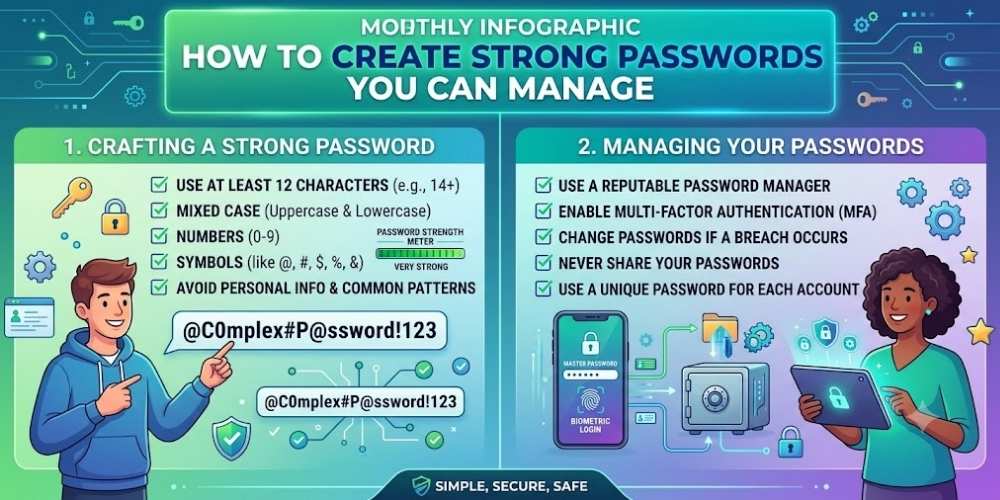
Long passwords are generally harder to crack than short complex ones. Every account should have a different password.
Avoid predictable substitutions, keyboard patterns, birthdays, and names.
Use Passphrases When Memorization Is Necessary
A passphrase combines several unrelated words into a longer secret that is easier to remember.
Do not use famous quotes or phrases that can be found online.
Use a Password Manager
A password manager can generate random passwords and fill them securely across devices.
Protect the password manager with a strong master password and multi-factor authentication.
Avoid Unsafe Storage
Do not keep passwords in unprotected notes, spreadsheets, emails, or screenshots.
Printed emergency recovery information should be stored in a secure physical location.
Change Passwords When Risk Exists
Change a password after a breach, suspected phishing, unauthorized login, or accidental sharing.
Routine changes are less useful than uniqueness and multi-factor authentication.
Key Takeaway
Security improves when simple protections are applied consistently. Keep systems updated, limit unnecessary access, use strong account protection, and review settings whenever devices or household needs change.
Frequently Asked Questions
How long should a password be?
Longer is generally better. Many experts recommend using at least 14 to 16 characters for important accounts.
Are passphrases secure?
Yes, when they are long, unique, and not based on common quotes or predictable word combinations.
Should I change passwords every month?
Usually not unless required. Change them after exposure or compromise, and focus on uniqueness and multi-factor authentication.

Vital Morgan is a cybersecurity researcher and technology writer with a passion for digital privacy, smart home security, and online safety. He specializes in creating practical guides on VPNs, password protection, cybersecurity best practices, smart home devices, and emerging security technologies. His mission is to help readers protect their homes, devices, and personal information in an increasingly connected world.