Password Manager Security Checklist
Quick summary: A password manager improves security by reducing password reuse, but the vault itself becomes a critical account. Careful setup is essential.
A password manager improves security by reducing password reuse, but the vault itself becomes a critical account. Careful setup is essential.
This guide explains the most important actions in a practical order. Focus on measures that reduce real risk, are easy to maintain, and fit the way your household uses technology.
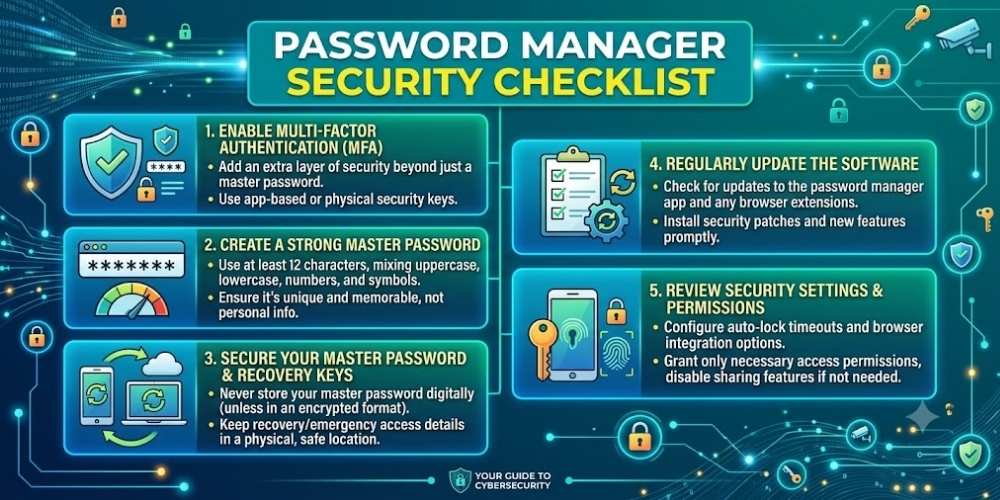
Create a Strong Master Password
Use a long, unique master password that has never been used elsewhere.
Because this password unlocks the vault, memorize it and avoid storing it in insecure digital notes.
Enable Multi-Factor Authentication
Use an authenticator app or security key when supported.
Store recovery codes offline in a secure location.
Review Emergency Access
Some services let a trusted person request access after a waiting period. Configure this only when it fits your household plan.
Make sure the trusted person understands the responsibility.
Keep Apps and Extensions Updated
Update the desktop app, mobile app, and browser extension promptly.
Install extensions only from official stores and verify the publisher.
Export Backups Carefully
Unencrypted password exports are highly sensitive. Delete temporary files after use and store backups encrypted.
Test account recovery before an emergency occurs.
Key Takeaway
Security improves when simple protections are applied consistently. Keep systems updated, limit unnecessary access, use strong account protection, and review settings whenever devices or household needs change.
Frequently Asked Questions
What happens if I forget the master password?
Recovery options vary. Some providers cannot recover encrypted vault data, so store recovery information securely.
Are browser password managers safe?
They can be useful, but compare their encryption, account recovery, cross-device support, and security controls.
Should I use SMS for password-manager 2FA?
An authenticator app or security key is generally stronger when available.

Vital Morgan is a cybersecurity researcher and technology writer with a passion for digital privacy, smart home security, and online safety. He specializes in creating practical guides on VPNs, password protection, cybersecurity best practices, smart home devices, and emerging security technologies. His mission is to help readers protect their homes, devices, and personal information in an increasingly connected world.