How to Secure Smart Speakers and Voice Assistants
Quick summary: Smart speakers are always nearby and often connected to calendars, shopping accounts, lights, cameras, and locks. Security settings should match how the household actually uses them.
Smart speakers are always nearby and often connected to calendars, shopping accounts, lights, cameras, and locks. Security settings should match how the household actually uses them.
This guide explains the most important actions in a practical order. Focus on measures that reduce real risk, are easy to maintain, and fit the way your household uses technology.
Protect the Main Account
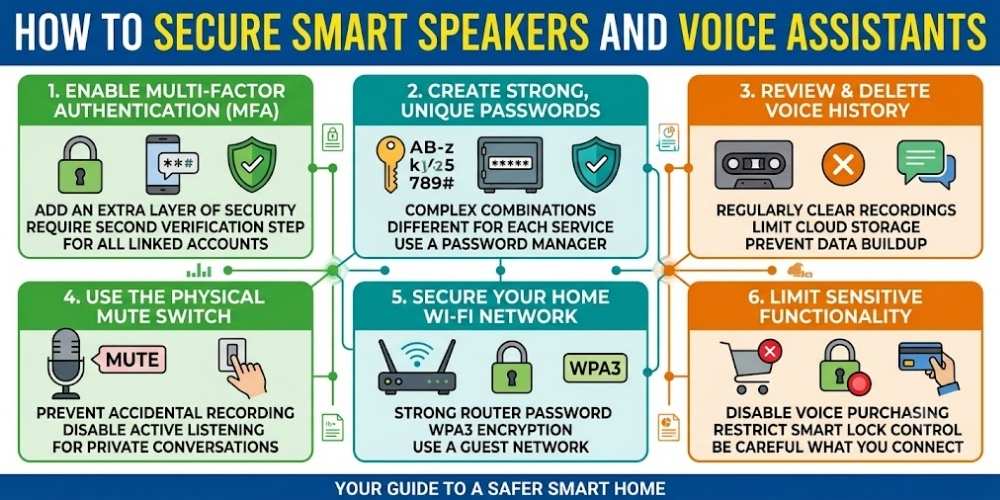
Use a unique password and multi-factor authentication for the account that controls the voice assistant.
Review all household members and linked devices regularly.
Review Voice Recording History
Many services allow users to view and delete stored recordings. Configure automatic deletion if available.
Disable human review or personalized data use when you do not want it.
Limit Voice Purchases
Require a PIN or disable voice purchasing to prevent accidental or unauthorized orders.
Review payment methods connected to the account.
Control Sensitive Integrations
Be cautious when connecting door locks, garage doors, cameras, or alarm systems to voice commands.
Use additional confirmation requirements for actions that affect physical security.
Use the Microphone Mute Button
Mute the microphone during private conversations or when the assistant is not needed.
Remember that software settings and physical mute controls may work differently.
Key Takeaway
Security improves when simple protections are applied consistently. Keep systems updated, limit unnecessary access, use strong account protection, and review settings whenever devices or household needs change.
Frequently Asked Questions
Do smart speakers record everything?
They continuously listen for a wake word, but accidental activations can occur. Review recording history and privacy settings.
Can visitors use my voice assistant?
Yes, unless voice recognition, purchase controls, and device permissions are configured to limit access.
Should I connect a smart lock to a voice assistant?
Only when strong account security and confirmation controls are available and you understand the risks.

Vital Morgan is a cybersecurity researcher and technology writer with a passion for digital privacy, smart home security, and online safety. He specializes in creating practical guides on VPNs, password protection, cybersecurity best practices, smart home devices, and emerging security technologies. His mission is to help readers protect their homes, devices, and personal information in an increasingly connected world.